



HBYS electronic queue system

In hospitals managed by Hospital Information Management Systems, the numbers generated in ticket machines and the principle of calling these numbers are used in patient admission, radiology and blood collection departments, queue management systems and outpatient patient screens controlled by HIMS.
Q-smart Queue Systems and IPTV Queue Monitor integrated into the HIMS system allow you to use technology as you imagine in the hospital.
With powerful integration options, carefully selected hardware, our own operating system, strong technical support infrastructure and 15 years of experience in the hospital sector, we are ready to free your HIMS from queue problems.
Q-smart Queuing Systems
The queue system can be considered as taking a queue from the screen and calling that queue. This is only 5% of the work we do.
It ensures that patients with an appointment enter the outpatient department without going to the reception department.
Patients over 65 years old are given priority
For patients registered in the HBYS, you can place an order without the need for the reception department
Distributes staggered shifts for the secretary and nurse in the blood collection department
Provides a queue system solution for the radiology department
Transfers the patient whose registration is completed to the department
Provides a desktop queue system solution for level services without reusing the ticket machine
With the integration of Pos and Label printers, it prints the serial number from the existing printer without the need for a new printer.
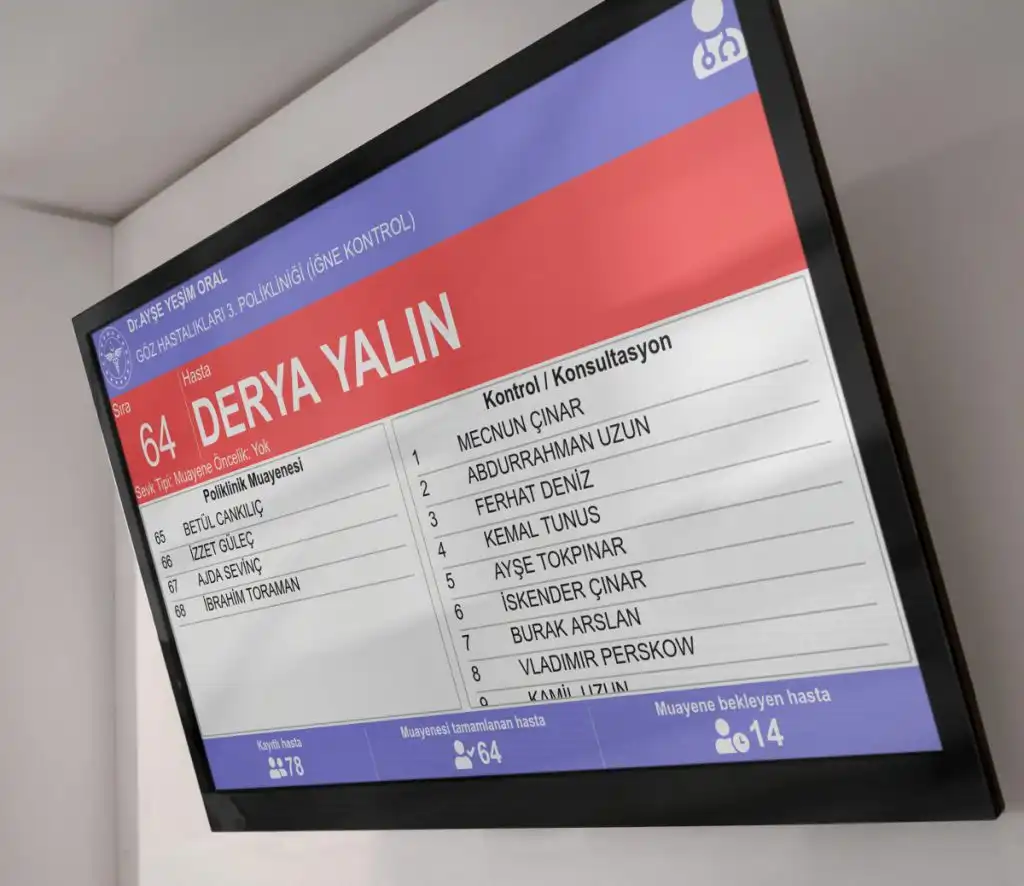
Q-smart IPTV Queue Monitor
In hospital information management systems, an image taken from the second monitor output of the computer is used to track the order in the polyclinic/doctor’s room. In this program, unwanted images can be broadcast to citizens, rich multimedia cannot be displayed except for the serial number, the content cannot be personalized, the VGA cable used is limited to 20m, modification is required when the monitor cable is broken.
HBYS does not use its own computer, it is impossible to broadcast unwanted images.
It displays rich multimedia content in closed polyclinics or outside working hours and broadcasts informational messages.
Offers 4K image quality
Connects via Ethernet or WiFi, no wiring required
Only a 220V city network is needed at the location.
Live news, health news, central time, weather…
Eliminates the video transmission distance limitation of VGA cable
Prevents unwanted changes caused by monitor wires
Can broadcast in various formats (Monitor, Tablet PC, etc.)
Works in any orientation, automatically optimizing its content for vertical or horizontal use.
No need to use it at the door, if you want, a 10-inch monitor and a doctor/clinic board can be used in place.
Patient admission queue system
1. The person who comes to the patient admission process receives a queue number from the ticket machine to perform the procedure. Here, patient admission departments within the hospital can be separated and patient numbers can be prioritized with options such as patients over 65 years old, appointment-only or regular patients.
2. The patient who receives the queue number goes to the waiting room to be called by the relevant patient admission staff and sits down and waits for the queue number to be called.
3. The admission staff presses the call button on the call terminal to call the new number. According to the permissions given to the patient admission staff, the system finds the ticket number in the queue and displays the patient’s queue number on the main routing screen.
4. The patient whose serial number is called goes to the staff to perform the procedures.
5. At this stage, the patient is registered in the Hospital Information Management System. After registration, the patient is sent to the relevant polyclinic. The queue system in the polyclinic can be implemented with the HBYS system or transmitted via the Q-smart queue management system.

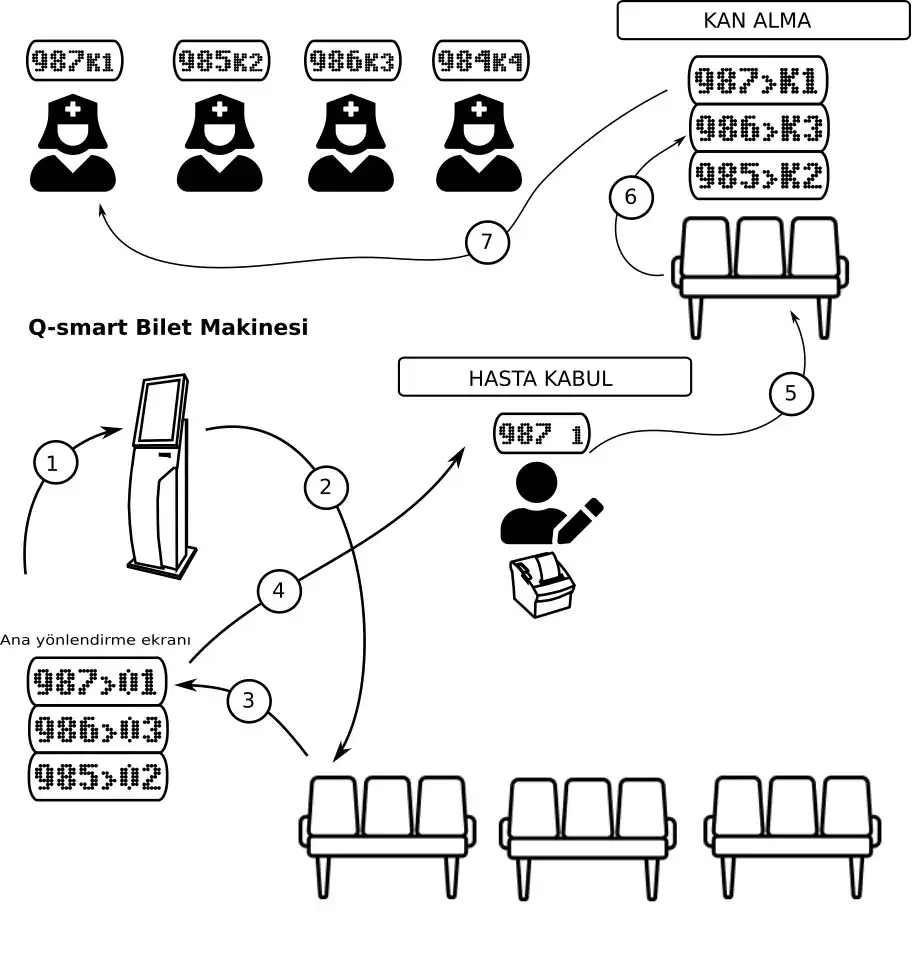
Staged queue system for analysis, blood collection, X-ray
1. The patient who comes for the registration process receives a queue number from the ticket machine to perform the procedure. Here, the priority can be assigned to patient numbers with options such as emergency, appointment or regular patient with options such as 65 or above.
2. The patient who receives the queue number goes to the waiting room to be called by the patient admission staff and waits for the queue number to be called.
3. The admission staff presses the call button on the call terminal to call the new number. According to the permissions given to the patient admission staff, the system finds the ticket number in the queue and displays the patient’s queue number on the main routing screen.
4. The patient whose serial number is called goes to the staff to perform the procedures. If there is a need such as a tube for analysis, it is delivered to him. The patient’s ticket number is transferred to the next level.
5. After registering, the patient waits for the queue number to be called for the next operation.
6. The nurse presses the call button on the call terminal to call the staff for the next operation, such as an X-ray specialist. The system finds the ticket number in the queue and displays the patient’s queue number on the main routing screen and calls it to work.
7. The patient called by the serial number goes to the staff to perform the procedures.
The IPTV monitor solution communicates with the web service received from the HBYS system. The information defined for each monitor is loaded as content to the appropriate screens. The system broadcasts the patient information received from the HBYS live on the screens.
Supports SOAP or REST web services
Compatible with full-size and 4K resolution screens
Supports the use of Tablets instead of monitors
In addition to outpatient clinic information, it displays information from sources such as weather, live news, health news.
Displays rich multimedia content in cases where the clinic is not providing service.
Works in horizontal or vertical orientation
Connects wirelessly via Ethernet or WiFi
Only 220V electricity is needed at the installation site.
No wiring with the monitor cable is required
Doctor, Technician or Nurse cannot interfere with the published content
It broadcasts centrally controlled content, not the shared screenshot from the Doctor’s computer, and does not show unwanted images to citizens.
