



Central system

Central system management, central reporting
Q-smart queue management system has an intelligent central management infrastructure. With a centralized reporting and management infrastructure, you can control the management of all your branches from one center, monitor branch performance, monitor the density in your branches live, access smart filters about unwanted situations, and provide advanced artificial intelligence monitoring. your system.
Rational architecture
It consists of a central system management, CMS (content management server) and ticket machines used in your branches. Ticket machines connect to the CMS over the network and synchronize automatically.
All changes you make in the center will be notified to your branches in a short time (2 seconds) and they will be automatically synchronized with the center.
Thanks to the same smart technology, it communicates with the CMS during the work done in the branches and instantly communicates with you information such as the performance status of the branches, tickets issued, service queues, and personnel work information. coordination center.
With central management, you can easily manage the templates of tickets printed in your branches, queue configurations, or advertisements broadcast on your screens from a single point.


Web Design
The central management solution is designed to work seamlessly in landscape or portrait orientation from a desktop, tablet or smartphone.
You can connect to your system from anywhere with standard web browsers to get live reports, monitor your system status online, change your ticket templates, add shifts to any branch and edit the permissions of any personnel.
All this without the need to install any software on your phone or computer. It works fully compatible with your standard web browsers.
Operations center application
Central system management comes with monitoring tools that can be used in your operations center and are compatible with Smart or LCD TVs.
Using TV monitoring tools, you can get live information about all your branches and the equipment in your branches.
Designed with Google Maps, the system always provides fresh map information. The starting position and zoom level can be selected as you wish, so you can view your systems located in one building or your systems in Turkey or around the world at the same time.

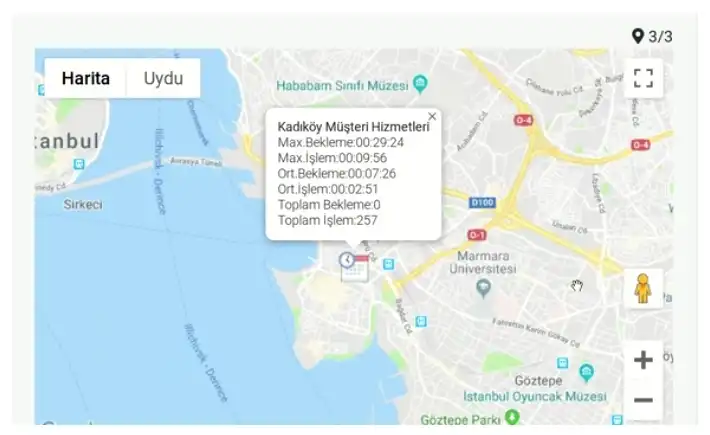
Map integration
The central system management solution comes with built-in map integration. The system, which provides technical or performance data for your coordination center, presents the acquired data live by zooming in on the relevant locations on the map in light of live data received from your branches.
It automatically detects branches on the map that exceed your waiting time, have many waiting customers, and have unusually long processing times and brings them to the attention of your managers.
The map’s scanning speed, zoom level, information to be displayed and branches, and update time can be customized as desired.
Detailed central performance reports
The data collected at the center of your branches helps you prepare advanced reports. With the report results you create, you can check the performance between branches and evaluate the performance of branches, shifts or personnel by comparing them with the entire system.
With the performance report that can be prepared by working hours, days of the week, weeks of the year, months or years, you can get specific answers to your questions about your workload, which day of the week, which hour, and what month.

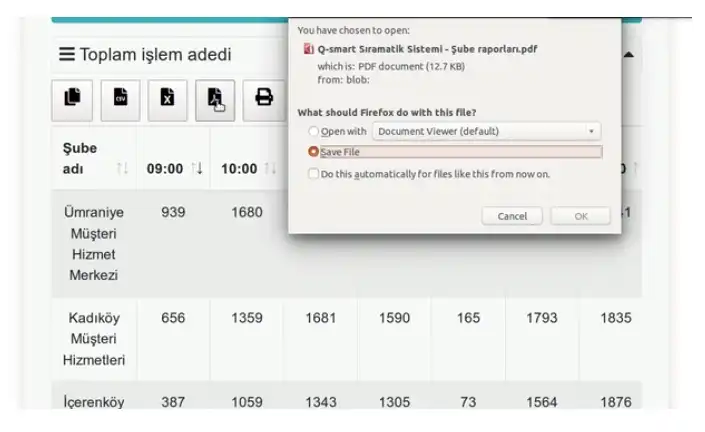
Wide export alternatives
With advanced spreadsheet technology, you can instantly modify report data with your desired sorting options and export data outputs to external environments with Excel, PDF, spreadsheet, printable, and buffer output options.
Dynamic library, runtime interaction
With the dynamic chart library, you can change the chart type (line, bar, horizontal bar, pie…) live, remove any branch from the report, and add any branches to the report instantly. re-report. You can view details about the data you want to review by hovering over it.
